You need to switch to Linux RIGHT NOW!!
Beautiful, fun & opinionated Linux by DHH
Linux that's already set up. Omarchy takes Arch — fast, current, free — and tunes the whole desktop for you: window layout, themes, shortcuts, apps. Install it, log in, get to work.
The best of Arch, already set up.
Arch Linux is famous for two things: it's fast and always current, and it takes a whole weekend to configure. Omarchy keeps the first part and does the second for you. Hyprland for windows, Quickshell for the desktop itself, the best apps in every lane — hundreds of small decisions, made once so you don't have to.
"Opinionated" just means we picked. Every setting is still a plain file you can open and change, so start with ours and make it yours whenever you feel like it.
[ 01 ]
Windows that organize themselves
New windows tile neatly instead of piling up. No dragging, no resizing, no clutter. It sounds small. You'll miss it on every other computer.
[ 02 ]
Fast, even on old hardware
Linux runs light and Omarchy keeps it that way. Laptops you'd retired suddenly feel useful again.
[ 03 ]
22 themes, one keystroke
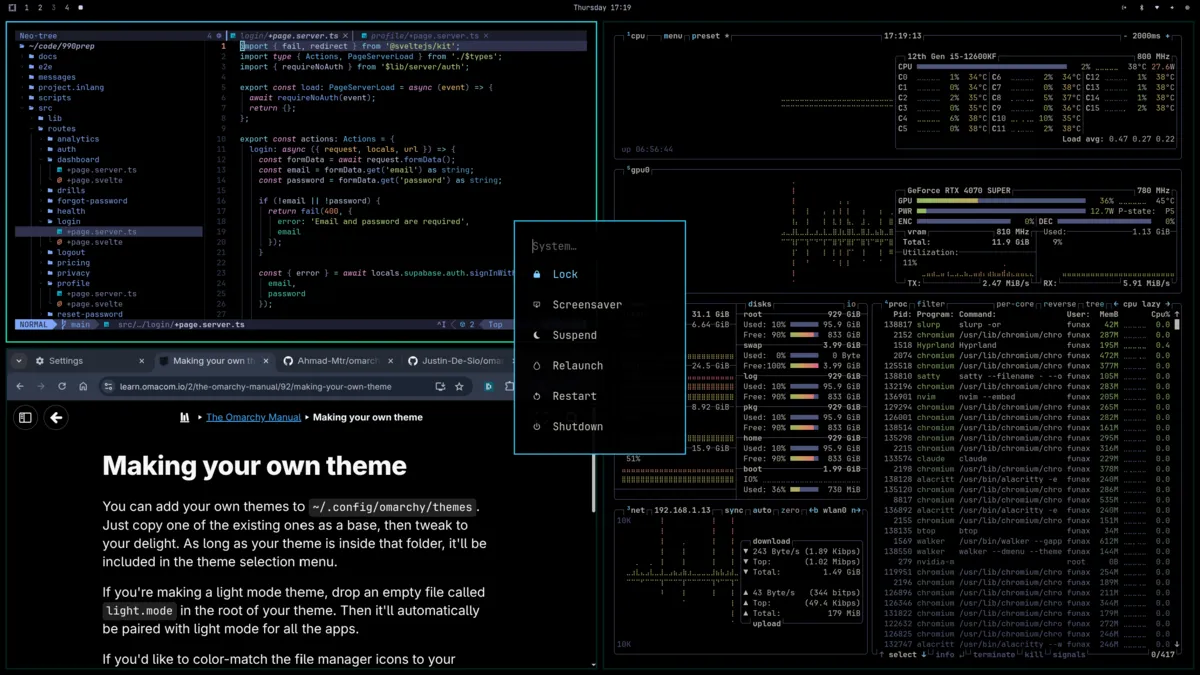
Switch the whole look — wallpaper, colors, even the browser — with a single shortcut. Twenty-two come built in, and the community has hundreds more.
[ 04 ]
Everything one keypress away
Hit the Super key and start typing. Apps, settings, files — the Omarchy menu finds them, so you never have to remember where anything lives.
[ 05 ]
Apps, ready on day one
Browser, the Foot terminal, a fully set-up editor, media players. You log in to a working computer, not a blank screen and a command prompt.
[ 06 ]
Updates without the homework
One command updates everything, with plain-language prompts along the way. Anything break? Roll back on the next reboot and carry on.
Make it yours.
When the built-ins aren't enough, the community steps in: 1,700+ plugins add widgets, launchers, integrations and decorations that slot straight into the Omarchy menu. Install in two clicks; remove just as fast. The first plugin competition just crowned its winners:
[ 1st place ]
VIEW →
[ 2nd place ]
VIEW →
[ 3rd place ]
VIEW →
BROWSE 1,700+ PLUGINS →
Radio Atlas
Spin a globe, land on a city, and listen to what they're listening to. By Akshar Patel.
Omagotchi
A little creature that lives in your bar and needs you. Absolutely nobody needed this and everybody wants it.
AirPods
Battery levels and one-click switching, right in the bar. The kind of thing you only miss when you come from a Mac.
omarchyplugins.com
The full catalog — browse by category, copy the install command, done.
Beautiful the moment you boot.
Twenty-two hand-tuned themes come standard. One keystroke switches the entire desktop — wallpaper, colors, terminal, the lot. These community favorites show how far it goes.
An agentic OS.
Omarchy treats AI agents as first-class citizens — not a chat window bolted on, but hands on the whole desktop. Every major agent CLI is pre-wired, themed like everything else, and one command away.
What they're good for? Everything you keep putting off:
- Fix the bug, write the tests, update the docs — while you're at lunch
- They know your machine: the omarchy skill teaches agents the system, so they can debug what breaks or build you a plugin
- Let them actually work: auto-approve mode means they edit and run, not just suggest
- Go parallel — tile a whole swarm of agents, each in its own pane
- Bring your favorite: claude, codex, opencode, grok, copilot — nothing downloads until you first run one
$ claude # or codex, opencode, grok, copilot
$ cx # Claude Code, set to auto-approve
$ tsl 4 claude # a swarm of four, tiled
See it before you install it.
DHH's full tour of Omarchy 4 — the why, the install, and the whole desktop.
Omarchy Quattro — the full release tour
What you're in for:
- Why Omarchy exists, and who it's for
- A real install on a real machine, start to finish
- The complete tour: tiling, themes, the menu, the details
- The honest parts — what's missing and what's next
1 hour 21 minutes. Worth it — make a coffee.
Shorter takes
I Didn't Expect Omarchy 4 to Be This Good
Is Omarchy 4 The Best Linux Distro?
I Installed Omarchy 4… and I Get the Hype Now
You NEED to try this Linux Setup! (Omarchy for Newbs)
Is it for you?
Made for you if…
- You want a computer that's already set up, but you like the idea of Linux
- You'd rather have great defaults than a hundred settings screens
- You live in a browser, a terminal, or a text editor
- You want your desktop to look as good as it runs
Probably skip it if…
- One Windows app runs your work life — keep a foot in both worlds with dual boot
- Your must-play games need anti-cheat that doesn't support Linux
- You'd rather configure every detail yourself — other distros love that too
- You want a desktop with no personality. This one has opinions.
Up and running in minutes.
One ISO, one USB stick, one reboot. If you've installed a video game, you can install this.
2
Flash a USB stick
Any flasher works. Terminal people, the dd command is right here.
3
Boot and follow the installer
It handles the disk, the drivers, the works. Ten minutes later, you're logging in.
$ dd if=omarchy-4.0.1.iso of=/dev/sdX bs=4M status=progress
A community that shows up.
Thousands of people run Omarchy, and they're unusually nice about helping newcomers.
The Discord
Come say hi. Newbie questions get answered fast.
The Meetups
Real-life meetups all over the world, run by users.
The Plugins
Add-ons from the community, one install away.
The Code
Everything's open source. Look under the hood.
The Workstations
Official hardware with Omarchy inside.
The Merch
Shirts and stickers, naturally.
Questions people actually ask.
Will it erase my disk?
Only if you tell it to. The installer can take the whole drive or share it with what's already there, and dual booting is covered step by step in the manual.
What kind of computer do I need?
Any x86_64 machine from the last decade — an old ThinkPad is the classic choice. 8 GB of memory and 20 GB of disk are comfortable. Intel and AMD graphics work out of the box; NVIDIA works too, with a driver install.
I've never used Linux. Really, is this for me?
Yes — it's built for exactly you. Nothing needs configuring on day one, the manual explains the keyboard shortcuts as you go, and the Discord answers beginner questions without condescension.
Can I keep Windows around?
You can dual boot, and the manual walks through it. That said, most people find they stop booting into the other one.
What about my Windows apps?
Some run fine through compatibility tools, some don't. If one app is mission-critical, check how it fares before you switch — or keep it on a second machine.
Can I game on it?
A lot of games run great, especially through Steam. The holdouts are titles whose anti-cheat doesn't support Linux — check your favorites first.
What does "opinionated" actually mean?
It means the defaults are chosen on purpose: one window manager, one set of apps, one way of doing things. You can change anything, but you never have to.
Is it really free?
Free as in costs nothing and is locked by nothing — MIT licensed. Development is funded by patrons and the Omacom Foundation.